Your family's admin, sorted in one place.
Passports, insurance, the MOT and the TV licence, with a reminder before anything runs out. Plus the shopping list, to-dos and calendar the whole family shares.
See it in action
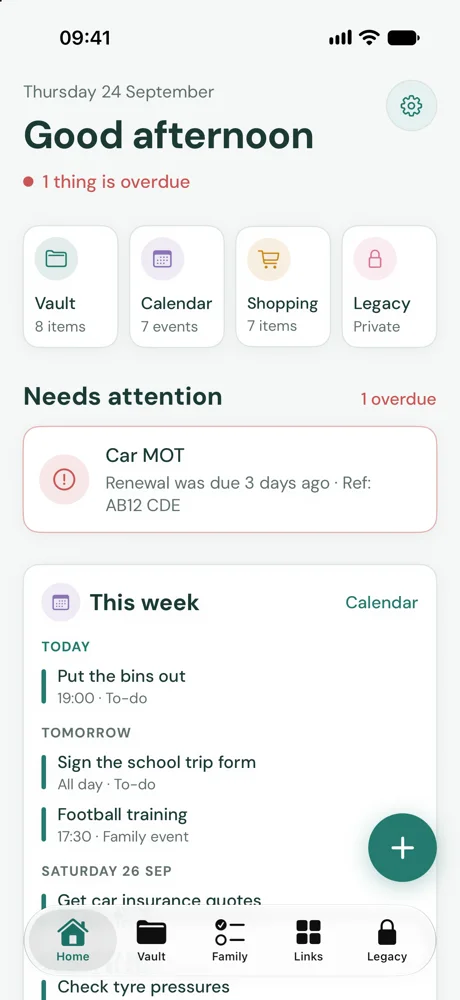
Fifty seconds of the real app: Home, reading a passport, the family lists and the sites the house runs on.
Everything the house runs on
Snap it, file it, forget it. Nell remembers the dates for you.
Every document, findable
Scan a letter or take a photo. The text is read so you can search for a policy number years later.
Reminders before renewals
Car and home insurance, MOT, road tax, broadband and more, each with sensible UK reminder times set for you.
Passports for everyone
Photograph each passport or licence and the number and expiry are filled in for you, for every person in the family.
Shared with the right people
Everything is private until you share it: with your partner, the whole household or one person.
The family organiser
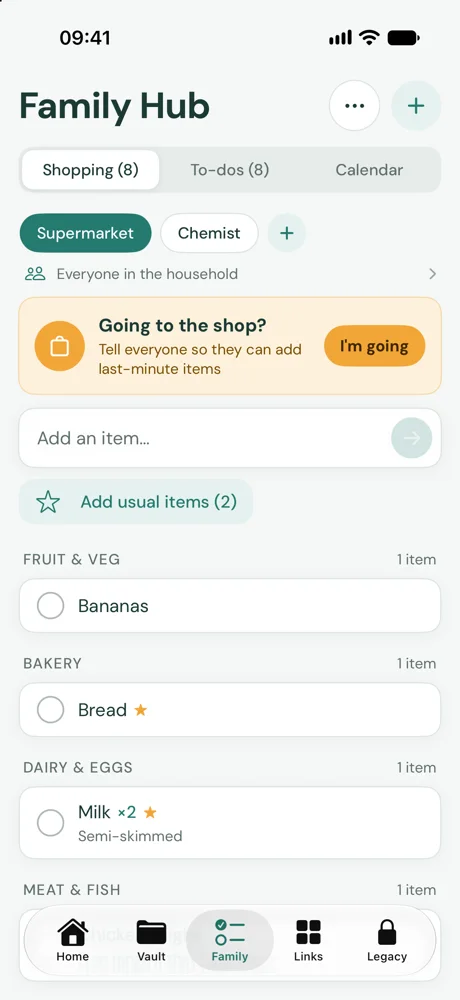
A shopping list that updates live, shared to-dos and a family calendar, with a nudge when someone's going to the shop.
A start page for the house
The council, school and energy sites you use most, as a customisable start page with your to-dos, calendar and weather.
Private by design
It holds the most important papers you own, so it's built to keep them that way.
FAQs
Straight answers to the questions families ask most. Anything else, just email us.
What is Nell?
Nell keeps your household's admin in one place. The Vault holds your policies, renewals and documents and reminds you before things run out. The Family hub has shared shopping lists, to-dos and a calendar. Links keeps the websites your family uses together, and the Legacy plan is a private guide for your loved ones if the unexpected happens.
It's made for UK households, so reminders follow UK norms, like 9 months' notice for a passport.
Which devices can I use it on?
There are apps for iPhone, iPad and Mac, and a web app you can use in any browser at nell.weareoneapps.com. Sign in with the same email everywhere and your items sync between them.
Scanning and reading documents, notifications and showing your own calendars are in the apps. The web app is handy on a work or family computer, and its start page makes a good browser homepage.
How do I sign in? Is there a password?
There's no password. Enter your email, and we'll email you a 6-digit code that lasts 10 minutes. Type it in and you're signed in. If it's a new email address, this creates your account.
On iPhone, iPad and Mac you can also use Sign in with Apple.
Does it cost anything?
Nell is free for one person, with up to 25 items. Nell Family adds unlimited items, a household of up to six, sharing and the full Legacy plan for £2.99 a month or £29.99 a year, with a two-week free trial. Only the household owner pays; everyone they invite uses it free. See your plan in Settings under Family plan.
How does scanning fill in the details?
When you scan or photograph a document in the app, it's read on your device. Nell reads the machine-readable lines on a passport's photo page and the fields on a UK photocard driving licence exactly. For other documents it looks for the provider, reference, date and price, and on devices with Apple Intelligence it uses Apple's on-device model to fill any gaps.
What it finds appears under “Filled in for you” so you can check it before saving. The text is also kept with the item, so a search finds words inside your scans.
How are reminders set?
Each item gets sensible UK reminders from its type as soon as you add a date. For example: car, home, travel and pet insurance 30 days, 7 days and on the day; MOT 30 and 7 days; vehicle tax 14 days and on the day; passports 9 and 6 months; driving licences 3 months; broadband, mobile and energy contracts 45 and 14 days.
You can change them in the item's Reminders section: remove any you don't want, or use “Add a reminder”. Turn “Remind me” off to stop them for that item.
Who can see what I add?
Only you, until you choose otherwise. Everything new is private by default, and nobody else in the household can see your private items, including the household owner.
When you add or edit an item, “Who can see it” lets you choose “Only me” or “Everyone in the household”. To pick specific people, use Share on the item.
What does “I'm going to the shop” do?
On a shopping list, tap “I'm going” on the “Going to the shop?” banner. Everyone else who can see that list is told straight away and has 10 minutes to add anything last-minute. If someone else is already going, you'll see their banner instead.
You need to be signed in, as it lets the rest of your household know.
Where are my files stored?
During the beta, files are stored encrypted on Nell's server in the UK, and cached on your devices so you can open them offline. Saving to your own Dropbox, Google Drive or OneDrive is coming.
If you use the app without an account, everything stays on your device only.
Are my documents sent to an AI service?
No. Reading your scans happens on your iPhone, iPad or Mac. Where Apple Intelligence is available, Nell uses Apple's on-device model, and nothing is sent to an outside AI service.
How do trusted contacts get access to my plan?
Add trusted contacts in the Legacy plan and choose which areas each person can read. They need a Nell account with that email address. They're told you've named them, but can't see anything until the plan is released.
If one of them asks for your plan, you're told straight away. If you don't decline within your waiting period (you choose from 48 hours to 30 days; it's 3 days unless you change it), the areas you chose for them are released. You can also “Release now” or “Decline” yourself.
Coming soon
Nell is being tested by families now. If you'd like to hear when it's ready, or try it early, drop us a line.
Email info@weareoneapps.com