Describe the music.
Get ten from every library.
Free early access until 31 October 2026
Trackfinder is a Mac app for videographers. Type what the scene needs, and it searches Musicbed, Epidemic Sound, Artlist, Audiio and Soundstripe at once, with previews and a link straight to the song page to license it.
Three steps, no tabs.
Say what you're cutting to
"upbeat acoustic first dance", "emotional cinematic piano", "indie folk highlight film with stomps and claps". Type it, or hold ⌥ Option + Space and just say it; the words appear as you speak and the search runs when you let go.
Every library, one search
Each library is searched live, in parallel, and answers with its ten best. Where a site has no real text search (Musicbed) or a loose one (Artlist), Trackfinder translates your words into that site's own genre, mood, instrument and theme filters.
Preview, then license where you always do
Play the clips right in the app and click along the bar to skip ahead. When one fits, "View on Musicbed" (or Artlist, or…) opens the real song page in your browser so you license and download exactly as before.
The libraries
All five are on to start; switch any off with a click. Sign in once per library in a window Trackfinder opens for you; it keeps the session for next time and never sees your password.

Musicbed
Filter translation
Epidemic Sound
Free-text search
Artlist
Category mapping
Audiio
Free-text search
Soundstripe
Free-text searchFive libraries, side by side.
Each library answers in its own column with ten tracks, genres, length, a preview, and a link to the song page.
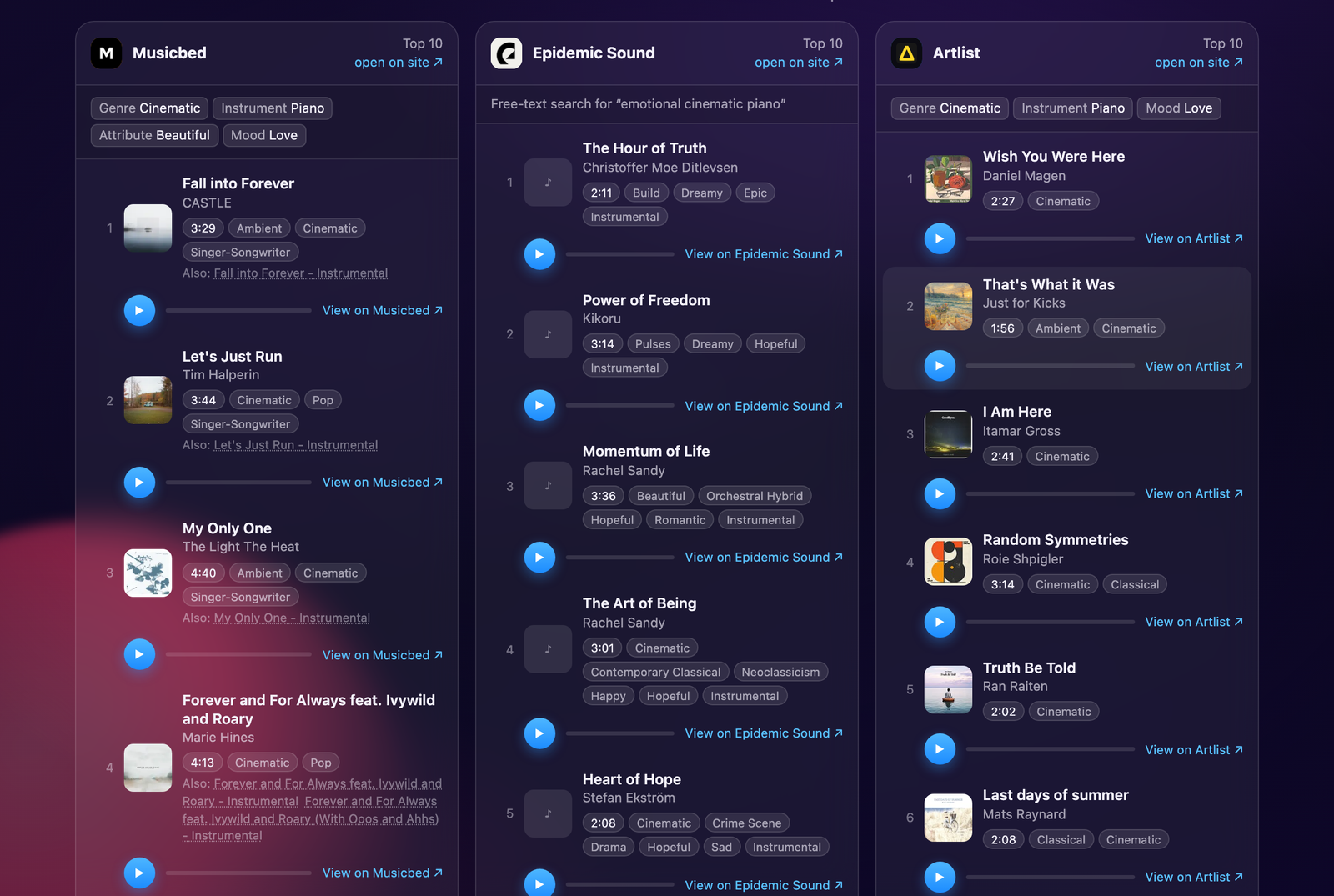
Built for the edit, not the algorithm.
Runs on your Mac
Searches happen from your own machine through Trackfinder's private browser profiles. The app sends us nothing: no account, no telemetry, and what you search for never leaves your Mac.
Honest about the results
When your words don't map to enough filters, it says so and loosens the search instead of showing an empty screen. Alternate cuts of a song are folded under the original.
Your subscriptions, your licences
Trackfinder never downloads or licenses anything on your behalf. It finds candidates; you complete the licence on the library's site as normal.
Early access
This is a first release shared with a few friends. If a search misfires or a library breaks, email info@weareoneapps.com with what you typed.
Fair things to ask
What happens on first launch?
Trackfinder downloads the browser engine it uses to search the libraries (about 100 MB, one time, into your Library folder). That takes a minute or two, then the app opens as normal.
What does it cost?
Nothing until the end of October 2026: this is free early access. From 1 November it's a £15 one-off licence, not a subscription, and future versions are included. If you downloaded it during early access you're welcome to keep using it.
Do I need subscriptions?
No. All five libraries can be searched without an account. Signing in only matters for whatever each site keeps behind a login, and you'll still need a subscription on the library's own site to license a track.
Which Macs?
macOS 13 Ventura or later on Apple Silicon (M1 and up). The app is signed and notarised by Apple, so it opens like any other download.
How does voice work, and where does my audio go?
Hold ⌥ Option + Space (or click the mic) and describe the track. Trackfinder uses Apple's speech recognition on your Mac; on Apple Silicon it runs on-device and the audio never leaves the machine. macOS asks once for microphone and speech permission.
Google sign-in isn't working.
Google often refuses to sign in inside an automated browser window. Use the email and password option on each library instead.
A preview won't play.
Most previews are MP3 and play fine. A handful of Musicbed's are .ogg files, which Apple's web engine can't play; the "View on Musicbed" link plays them on the site.
How will I know about new versions?
On launch, Trackfinder reads a small version file from this page and shows a bar with a download link if there's a newer build. That request carries nothing about you. "Stop checking" in the bar turns it off.
Does this page track me?
The only thing this page sends is an anonymous count: that it was visited, the name of the site you came from, and whether a download or buy button was pressed. No cookies, nothing that identifies you. The app itself counts nothing.
How do I remove it?
Drag Trackfinder from Applications to the Bin. Its saved sign-ins live in ~/Library/Application Support/Trackfinder and the browser engine in ~/Library/Caches/ms-playwright; delete those too if you want nothing left behind.